> For the complete documentation index, see [llms.txt](https://docs.xy.finance/llms.txt). Markdown versions of documentation pages are available by appending `.md` to page URLs; this page is available as [Markdown](https://docs.xy.finance/products/x-swap/gasless-transaction.md).
# Gasless Transaction
At this point, it's a well-known fact that managing and paying gas tokens for your on-chain transactions has always been a pain. While the account abstraction method in EIP-4337 can help abstract away gas completely, not all users or ecosystems have adopted EIP-4337. Given that more than 80% of users are still using EOAs instead of a smart contract accounts, XY Finance is now ready to support Gasless Transaction to bring a better UX to our cross-chain swap service for everyone.
### What Is Gasless Transaction?
Gasless Transaction is an optional method added to our token swap interface that enables users to swap certain tokens without paying gas on-chain.
### How Does It Work?
To allow EOAs to perform transactions gaslessly,
* Permit (EIP-2612) is used to collect an off-chain token approval signature from user EOAs
* EIP-712 is used to collect an off-chain transaction signature from user EOAs
* A Relayer EOA will send the transaction on-chain by paying gas itself
* User EOA signatures are still mandatory in this process, all transactions can only be processed on-chain if proper signatures are provided
* Our smart contracts will revert the transactions if the signatures are invalid
When Gasless is enabled, our platform covers the network gas cost using our native tokens. In return, a corresponding fee is deducted from the original token used in the swap to offset that cost. For example, if a user swaps USDC on Arbitrum to a meme token on Base, the fee is taken directly from the USDC amount being swapped, no additional tokens are spent from the user EOA. Refer to [Fee Structure](/fee-structure.md) for more details on the fee structure.
### How Can I Use Gasless Transaction?
{% tabs %}
{% tab title="Token Selection" %}
{% endtab %}
{% tab title="Route Selection" %}
{% endtab %}
{% tab title="Enable Gasless" %}
{% endtab %}
{% tab title="Token Approval" %}
{% endtab %}
{% tab title="Tx Signature" %}
{% endtab %}
{% tab title="Track Status" %}
{% endtab %}
{% endtabs %}
1. Select a token labeled with `Gasless` next to its symbol
2. Proceed with your swap configuration, click `Review Route` to continue
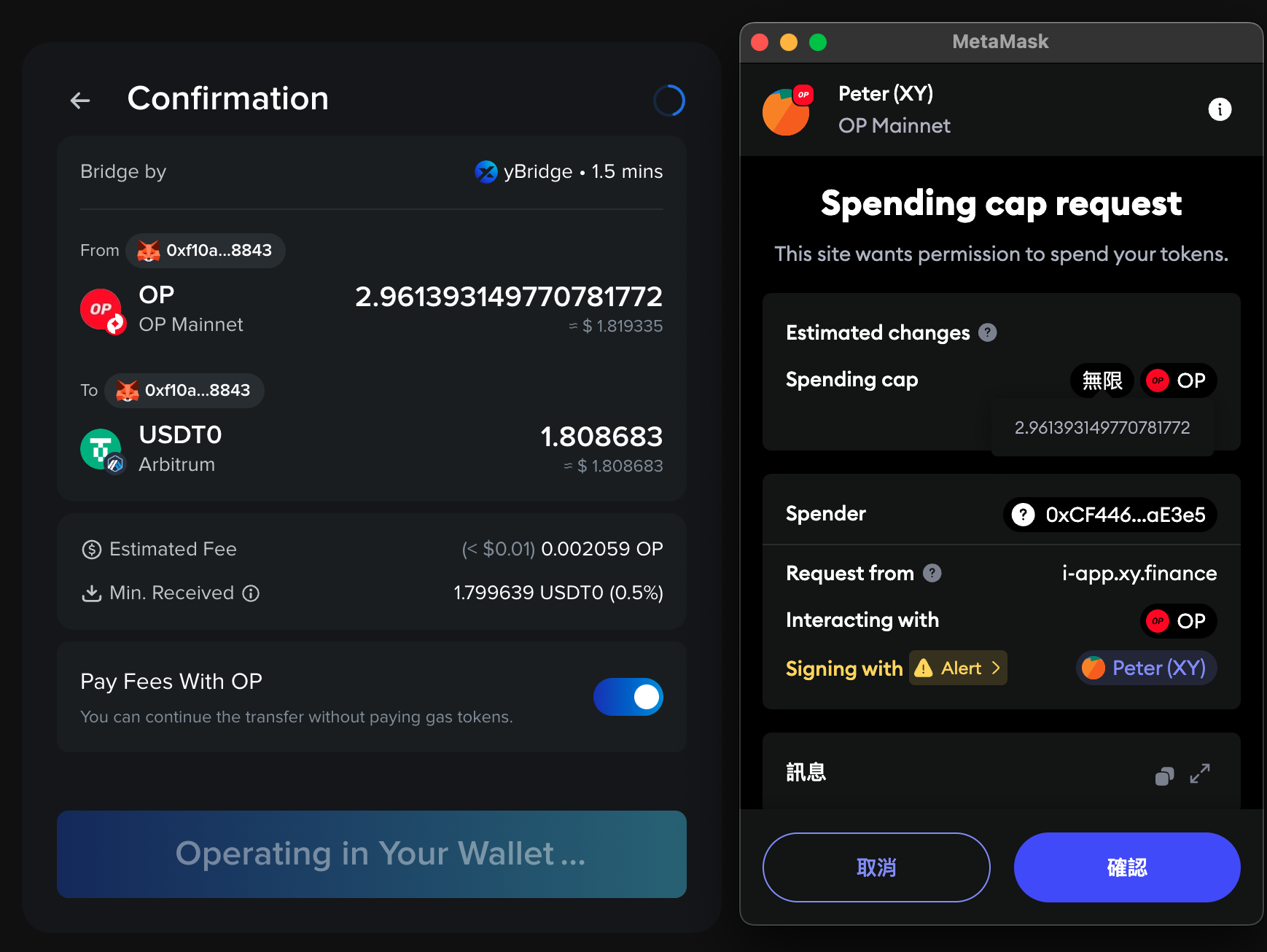
3. At the Confirmation page, you can enable Gasless with `Pay Fees With ` toggle
4. Upon clicking `Transfer`, you will be asked to sign a token approval
5. After token approval is signed, you will still be asked to sign a transaction
6. Once the approvals are signed, your transaction will be sent on-chain for processing